Mango9 Builder Studio
Domains and HTTPS
Search for a name, park it, and connect it to a published app.
A domain is the name customers type, such as yourbrand.com. It belongs to your account independently from any one project, so you can buy it early, leave it parked, or move it to another published app later.
Think of the domain as the address and the published project as the business operating there. You can own an address before the app is ready, and you can later point it to a different live project. Registration, assignment, DNS, HTTPS, and project deletion are related steps but not the same action.
Use a name customers can read, spell, and remember. Check the current registration and renewal price before purchase, and confirm that the account shown is the long-term owner of the name.
Example: Buy
northstarrepair.com, leave it parked while the repair portal is built, then connect it after the production release passes testing.
Search for a domain
Searching checks current registrar availability; it does not reserve the name until the purchase completes. Compare the exact spelling and extension, because similar alternatives may belong to different organizations or communicate a different market.
Review both the first-year amount and the renewal information shown by the product. A promotional registration price can differ from later renewals. Domain privacy, supported extensions, and current availability appear in the purchase flow.
Example: If
northstar.comis unavailable, comparenorthstarrepair.comwith a supported local or industry extension rather than choosing a confusing misspelling.
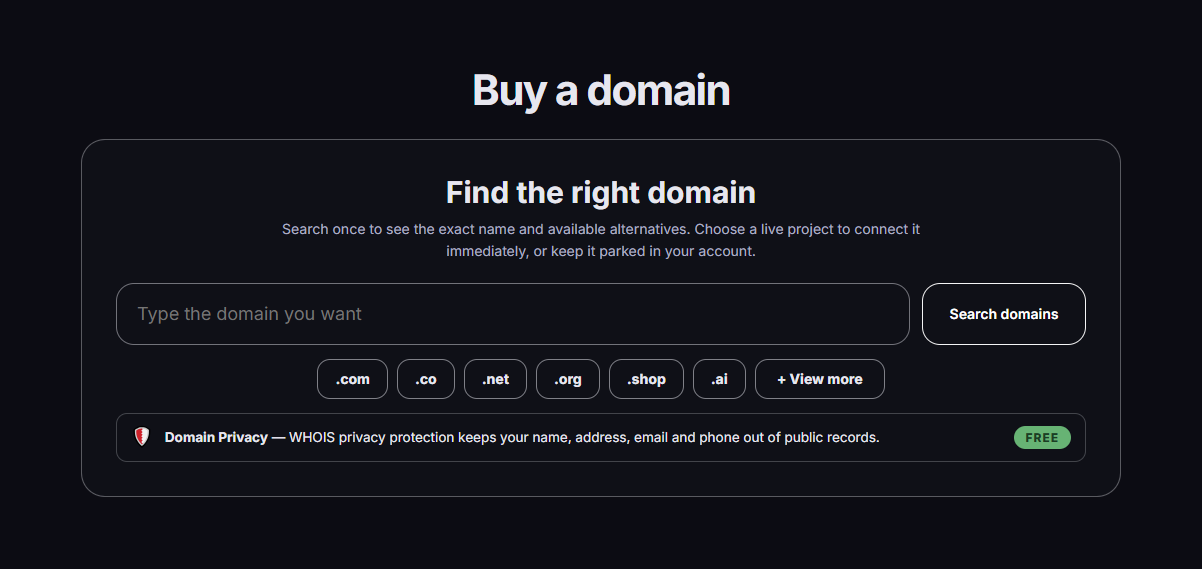
Type a name, add a common extension with one click, or enter the full domain yourself. Search results can include the exact name and available alternatives.
Choose Buy domain when you want a new name.
Enter yourbrand and press .com, .ai, or another available extension—or type the full name yourself.
Mango9 checks live availability and can show other supported choices.
Check the registration and renewal information before buying.
Keep the name unassigned, or connect it to a project that is already published.
Buying before the app is ready
You can buy northstarcrm.com today and leave it parked. After Northstar CRM is published, return to Domains and assign the name to that live project.
What parked means
A parked domain belongs to your account but does not point to an app.
Parking is useful when:
- you want to secure the name before building;
- the project is not published yet;
- you are moving the name between projects;
- the old project was deleted;
- you want the domain to stay unused for now.
A parked name remains owned and managed by the account but is intentionally not assigned to a production app. It can continue to renew, so parking is not cancellation. The domain page remains the place to review ownership, price, and future assignment.
Example: Park a seasonal campaign domain after the campaign ends so it does not point to an outdated page, while keeping the registration for next year.
Connect a domain you already own
Choose Connect domain, enter the full name, and select a published project. Mango9 shows the DNS record to add where you bought the domain.
Copy the hostname and target exactly. An apex name such as example.com and a subdomain such as www.example.com are separate DNS hosts and may need separate records. Remove conflicting records only after confirming they refer to the same hostname and are no longer needed.
DNS changes take time to appear across resolvers. Mango9 prepares HTTPS after the expected production mapping becomes visible. Keep the project published and avoid repeatedly replacing the record while propagation is still underway.
Example: Connect
app.northstarrepair.comto the published portal without changing the separatenorthstarrepair.commarketing site.
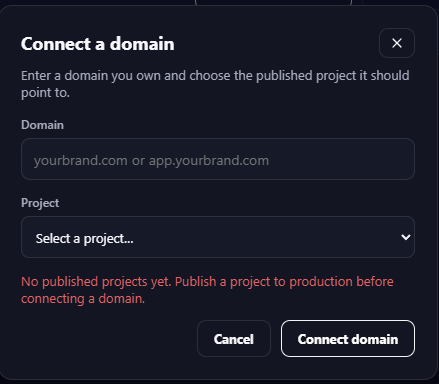
If no published project is available, the dialog explains what to do. Cancel, publish the intended project, then return to connect the domain.
A draft may appear in the project list with a Draft label, but it cannot receive a customer domain. Publish it first, then return to the domain assignment.
Move a domain to another project
Moving a name changes which production release customers reach. Confirm the destination app is published, healthy, and ready to answer on that hostname before removing the current assignment. Plan a quiet time for a customer-facing move when possible.
Example: Publish the rebuilt customer portal first, test its generated live address, then move
portal.example.comfrom the old production project to the new one.
Find the name in Console → Domains. Choose the parked or no-project option. Only published projects can receive the domain. DNS and HTTPS may take a little time to update.
If a project is deleted
The domain survives. It becomes unassigned so you can connect it to another published project. Deleting an app is not the same as cancelling a domain registration.
Check Domains after deleting or decommissioning a project. Decide whether the name should be parked, reassigned, or intentionally cancelled through the domain controls. This avoids an owned domain silently pointing nowhere while continuing to renew.
Example: Delete an obsolete event app, park
summerexpo.com, and later assign it to next year's published project.
HTTPS happens automatically
Once the correct DNS record points to Mango9, the platform edge prepares HTTPS. Avoid conflicting A, AAAA, or CNAME records for the same name unless the instructions specifically require them.
HTTPS issuance depends on public DNS pointing to the expected production route. A certificate cannot fix an incorrect or conflicting record. When the connection remains pending, compare the exact host and target, then allow normal DNS cache time before checking again.
Example: If
www.example.comis connected but the browser opensexample.com, verify whether the apex host was also configured instead of assuming HTTPS failed.
If your goal is to move or temporarily disconnect a domain, park it. Domain deletion or cancellation can affect the registration itself.