Mango9 Builder Studio
Integrations
Connect external capabilities to the correct project and keep secrets out of the app interface.
Integrations connect a Mango9 project to an external service. Examples include databases, storage, webhooks, automation, voice, email, or other supported providers visible in your Console.
An integration has two parts: permission to use an external account and application behavior that uses it correctly. Saving a credential does not automatically add a feature to every project. Building an email form does not automatically grant access to an email provider. Connect the credential and implement the workflow deliberately.
Use a separate, clearly named credential set when different clients or environments should not share access. This makes rotation, auditing, and removal much safer than reusing one owner-level key everywhere.
Example: Save “Northstar Resend production” for the Northstar project and “Sample CRM Resend test” for the sample project instead of connecting both to one unrestricted email key.
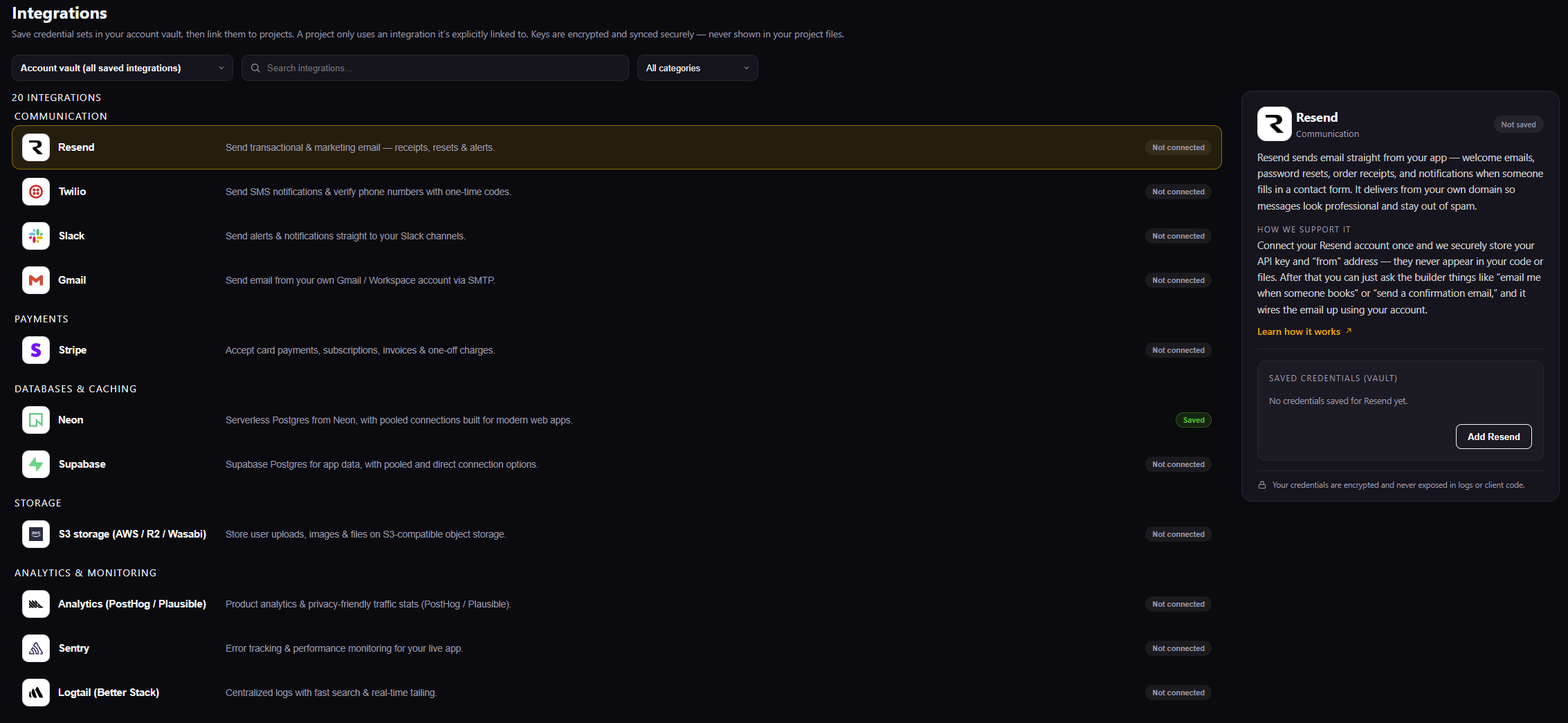
Choose a service from the catalog. The panel on the right explains what it does, whether credentials are already saved, and how Mango9 supports it.
View the credential sets saved for the current account without exposing their secret values. Use clear names to distinguish client, provider, test, and production ownership. Find a supported service by its familiar provider name. Select the result to read what it does, how Mango9 supports it, and whether credentials already exist. Narrow the catalog to communication, payments, databases, storage, analytics, or monitoring. Categories help you compare services that solve a similar product need without changing the current project. Save a new scoped credential set for the selected provider. Confirm the external account and environment first, then name the set so another owner can identify it safely later. Distinguish a credential stored in the account vault from one linked to the selected project. A Saved label alone does not grant every project permission to use that external account.
Before connecting
Confirm:
- the selected project is correct;
- you control the external account;
- the credential has only the permissions the app needs;
- development and production endpoints are not being confused;
- webhook URLs and signing secrets match the intended environment.
Start in the external provider's dashboard and create the smallest useful credential. Confirm whether it is a test or live key, which account or organization owns it, and whether the provider requires an allowed domain, callback URL, or webhook. Then return to the correct Mango9 project.
Do not use an integration merely because a credential already appears in the account vault. Read its name and connected projects. A saved credential can be valid while still belonging to a different client or environment.
Example: Use Stripe test credentials while building checkout. Connect live Stripe credentials only during the reviewed production setup, with the live webhook and signing secret.
Connect, then build
A reliable order is:
- Save the integration or environment variables.
- Ask Mango9 to use the existing named integration.
- Build the smallest end-to-end workflow.
- Test success, empty, permission-denied, and provider-error states.
- Publish only after the production credentials are ready.
This order separates connection problems from product problems. Testing the credential first proves Mango9 can reach the provider. Building one end-to-end workflow then proves the app uses it correctly. Error-state testing prevents a temporary provider failure from becoming a blank page or lost customer action.
Name the existing integration in the Build request instead of pasting its value. Ask for both success and safe failure behavior, and verify the result with a test account or sandbox when the provider offers one.
Example: “Use the connected Resend integration to email a booking confirmation. If delivery fails, keep the booking saved and show staff a retry action.”
Integrations are project-scoped
Use the project selector in Console. A credential for one customer's project must not be copied into another project merely because the service type is the same.
Project scope limits accidental cross-customer access. An account owner may see several saved credentials in the vault, but the selected app can use only the sets explicitly linked to it. Review those links when a project changes owner, moves from test to production, or is decommissioned.
Example: The booking app can use its calendar credential without exposing the sales CRM's separate calendar account.
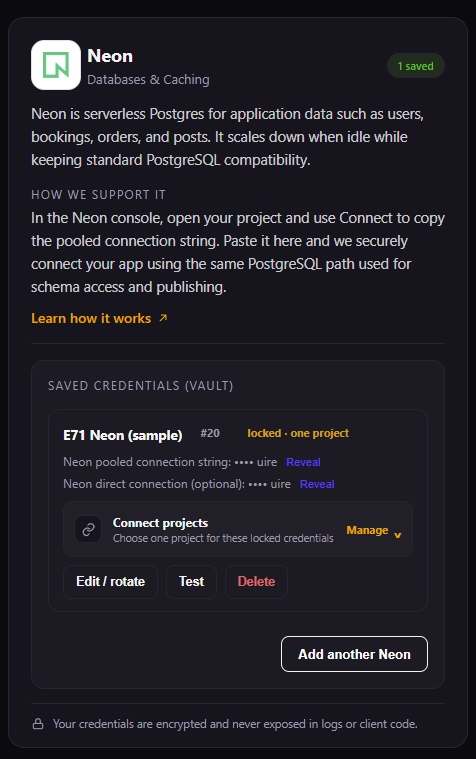
Saved credentials live in the account vault. Link them only to the projects that should use them.
Choose exactly which projects may use this saved credential. Link only the apps owned by the same client or environment instead of treating the account vault as automatic global access. Review the projects currently linked to this credential and change those links when ownership or environment changes. Removing a link can break a dependent workflow, so verify usage first. Replace an expired, exposed, or routinely renewed credential with the provider's new value. Preserve the intended project links, revoke the old key at the provider, and test the affected workflow afterward. Check whether Mango9 can use the saved connection before depending on it in Build or Publish. A successful test proves connectivity, while the application still needs its own end-to-end workflow review. Remove the saved credential only after confirming that no development or production project still requires it. Deletion in Mango9 does not automatically revoke the external provider key, so clean up both sides when retiring access.
Webhooks
A webhook lets an external service notify the app. Secure webhook handling normally needs:
- a fixed HTTPS endpoint;
- signature verification;
- a secret stored outside source;
- idempotency so a repeated delivery is safe;
- an acknowledgement strategy appropriate to the provider.
Ask Mango9 to implement those behaviors; do not publish an unsigned public mutation endpoint.
Providers retry webhooks when delivery is slow or unavailable, so the same event can arrive more than once. Signature verification proves the message came from the expected provider. Idempotency ensures a legitimate retry does not create a duplicate order, credit, or email.
Keep the public endpoint stable and environment-specific. Test and live webhooks should not share signing secrets or accidentally send live transactions into a development app. The provider dashboard should show successful responses after the route is deployed.
Example: A payment-success webhook can be delivered twice. The app should recognize the event ID and credit the customer's purchase only once.
Create a credential for the app with the smallest useful scope instead of reusing an owner-level key. Rotation and incident response are easier when each project has its own credential.