The Mango9 Marketing OS

Market. Connect.
Get work done.

Publish content, grow your audience and keep every customer conversation moving. Your campaigns, CRM, phone system, team and AI agents work together in one place.

Marketing OS is included with Pro and Max.

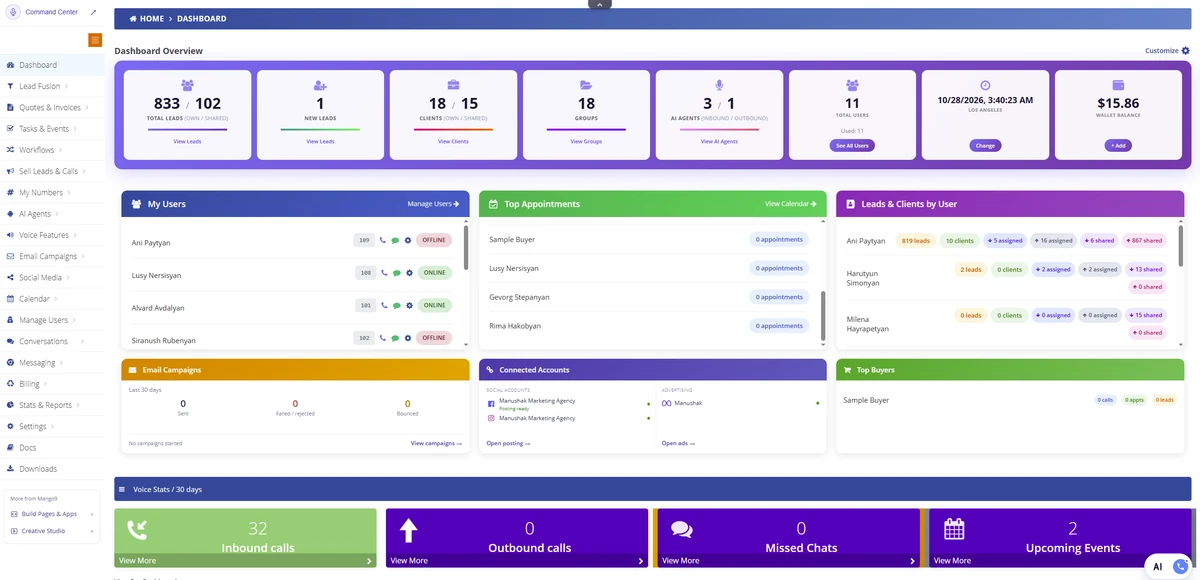
Marketing OS dashboard showing leads, team activity, appointments, email campaigns and connected accounts
Your leads, team activity, appointments and campaigns at a glance.

More work, fewer separate tools

One connected feature set.

From the first social post to the paid invoice, keep the work in the same customer workspace.

Showing 40 features

Social Media Posting

Draft, review and schedule posts for connected Instagram, Facebook and TikTok accounts.

Explore

Meta & Google Ads

Compare ad reports, review AI recommendations and optimize with approval and budget controls.

Explore

Email Campaigns

Build subscriber lists, reuse email templates, send campaigns and review delivery and engagement.

Explore

SMS Marketing

Send campaigns, build drip sequences and manage replies, keywords and opt-outs.

Explore

Comment & DM Automation

Create comment-to-DM flows, keyword replies and public responses on supported social channels.

Explore

Website Analytics

See visitor trends, traffic sources, top pages and devices to understand how people find you.

Explore

Multi-Social Media Chats

Manage supported messages and comments from connected accounts, with assignments and internal notes.

Explore

Web Live Chat

Answer website visitors in the CRM or mobile app and keep track of unread and assigned conversations.

Explore

Team Chat

Keep teammates and group conversations connected alongside your customer work.

Explore

Cloud Phone System

Connect your team with extensions, IVR, ring groups, call queues, recording and monitoring.

Explore

Web Phone & Click to Call

Call from your browser or a contact record using the phone service connected to your CRM.

Explore

Business Phone Numbers

Connect local or toll-free numbers, assign them to your team and manage call routing.

Explore

Leads & Client CRM

Keep contact details, ownership, activity, notes and follow-up together in one customer record.

Explore

Lead Finder

Search businesses by keyword and location, review the results and add prospects to your CRM.

Explore

Quotes & Invoices

Prepare estimates and quotes, create invoices, and track paid, partial and outstanding balances.

Explore

Lead & Appointment Selling

Set buyer pricing, assignments, distribution rules and caps, then review deliveries and reports.

Explore

Calendars & Booking

Share booking links, embed a booking widget and manage appointments, availability and reminders.

Explore

Mobile Customer Workspace

Take leads, social messages, website chats, team conversations and your calendar with you.

Explore

Tasks & Events

Organize work for humans and AI agents with ownership, dates, priorities, statuses and recurring activities.

Explore

AI Voice & SMS Agents

Configure assistants for customer questions, lead qualification, follow-up and appointment booking.

Explore

AI Command Center

Talk or chat with your CRM, review proposed actions and follow your agents’ activity.

Explore

Workflow Automation

Connect triggers, conditions, delays and follow-up actions, or ask AI to draft the workflow.

Explore

APIs & Integrations

Connect contacts, calendars, messaging and voice tools to the software your business uses.

Explore

Websites & Landing Pages

Build a business website or campaign page with Mango9 and connect it to your customer workflow.

Explore

User Extensions

Give staff their own extensions for internal calling, direct transfers and team routing.

Explore

Multi-Level IVR

Greet callers with phone menus and direct them to the right department or extension.

Explore

Call Queues & Ring Groups

Distribute incoming calls across your team with queues, simultaneous ringing or sequential routing.

Explore

Time-Based Call Routing

Route calls around business hours, holidays, caller ID and team availability.

Explore

Call Transfers & Forwarding

Transfer callers to an extension or outside number, or forward incoming calls to another destination.

Explore

Call Parking & Pickup

Park a call for another teammate to retrieve, or answer a call ringing on another extension.

Explore

Call Recording

Keep recordings for call review, coaching and training, with cloud storage and playback.

Explore

Call Monitoring & Coaching

Listen to active calls, coach with whisper mode or join a conversation with call barging.

Explore

Voicemail to Email

Use custom greetings and receive voicemail recordings by email for easier follow-up.

Explore

Voicemail Drop

Record or upload reusable voicemail messages for your team’s calling workflow.

Explore

Conference Calling

Bring teammates and customers into a shared conversation with conference bridges and three-way calls.

Explore

Hold Music & Greetings

Personalize the waiting experience with hold music, recorded greetings and announcements.

Explore

Call Reports & Agent Activity

Review call activity and agent outcomes by date to identify follow-up and coaching needs.

Explore

AI Call Intelligence

Review transcripts, summaries, sentiment, quality scores and suggested next steps after conversations.

Explore

Desktop Calling & Desk Phones

Work from the Mango9 Windows app, browser extension or supported IP desk phones. See available apps and setup options.

Explore

Caller ID & Call Controls

Recognize incoming callers, manage blocked numbers and use call waiting or do-not-disturb settings.

Explore

Publish & connect

Your content. Your conversations. Together.

Plan the post, start a conversation and keep the reply moving. Manage social publishing and supported messages across your connected accounts.

  • Draft, approve and schedule social posts
  • Assign chats and keep internal notes
  • Build comment and DM follow-up flows
Talk to us about social tools
Marketing OS post composer with Instagram, Facebook and TikTok previews
Social posting

Write the caption, attach your media and preview the post for each channel before publishing or scheduling it.

Full size

Meta & Google Ads

See the results. Know what to improve.

Bring Meta and Google Ads into one reporting workspace. Use your campaign data to guide changes to audiences, placements, creative and spend.

  • Compare spend, conversions and cost per result
  • Review AI optimization recommendations
  • Use approvals, budget limits and change history
Explore ad reporting & optimization
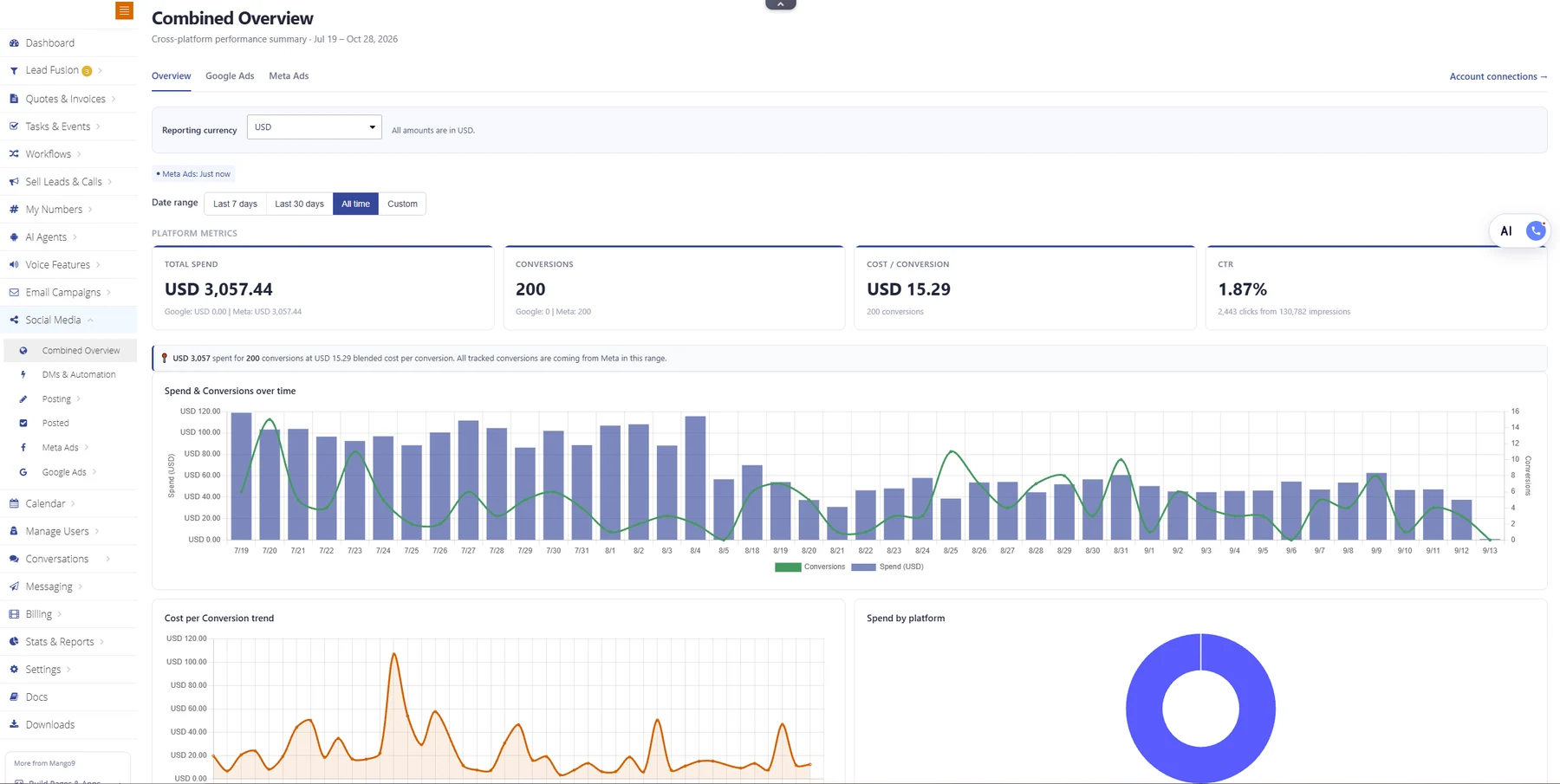
Combined Google and Meta advertising reports with spend and conversion trends
Ad reports

Compare connected Google and Meta accounts over the same date range. Track spend, conversions, cost per conversion and click-through rate.

Full size

CRM, tasks & automation

A clear next step for people and AI.

Keep client records, team tasks and AI agent activity in the same workflow. Move from a new lead to an appointment, quote or invoice with the details close at hand.

  • Tasks and events for humans and AI agents
  • Shared calendars, priorities and reminders
  • Email, SMS and CRM actions in your workflows
Explore connected workflows
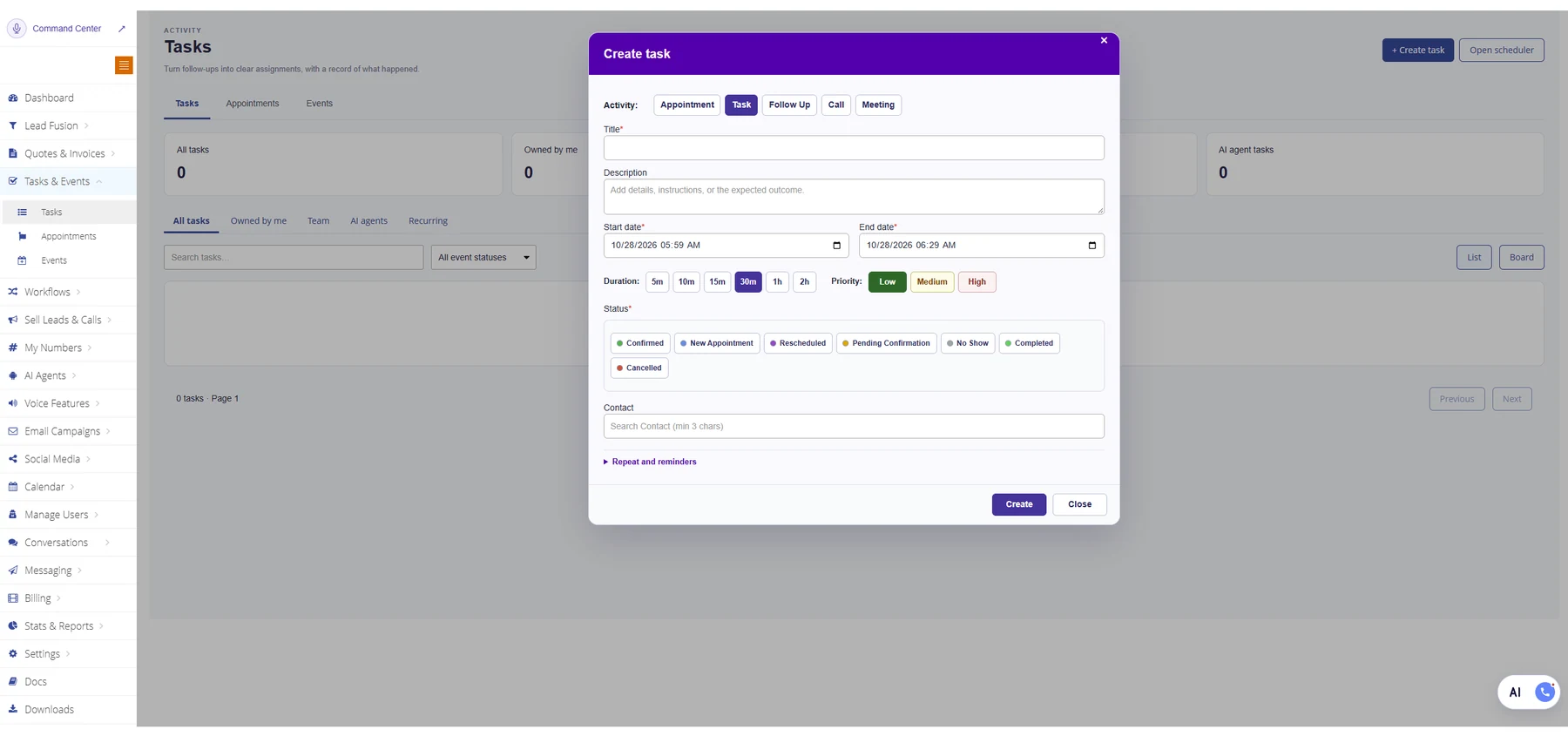
Task creation with activity types, dates, priority and status, alongside team and AI agent task views
Tasks & events

Create a task, follow-up, call or meeting with dates, priority and status. Use team and AI agent views to see who is responsible for the work.

Full size

Calls, agents & appointments

Equip the team behind every conversation.

Give your assistants a connected phone system, or configure AI agents to handle questions and booking. Run your own sales operation or sell leads and appointments to clients.

  • Voice agents with CRM and booking context
  • Calling tools for virtual call center assistants
  • Buyer pricing and lead distribution controls
Explore the cloud call center
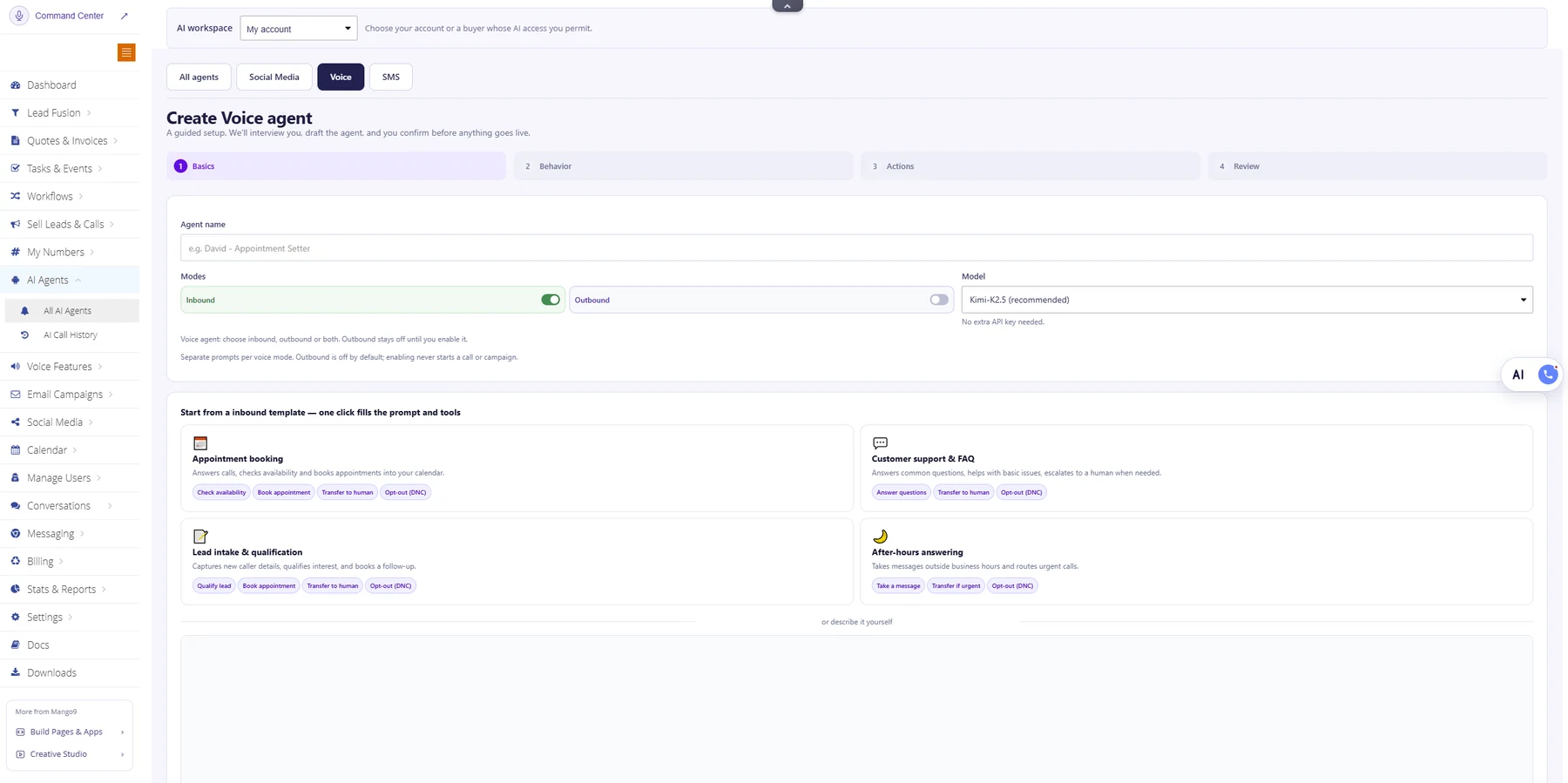
Voice AI setup with inbound and outbound modes and booking, support and lead intake templates
AI agents

Choose how an agent handles incoming and outgoing conversations. Start from booking, support or lead qualification templates, then configure its behavior.

Full size

Telephony & call center

Route the call. Equip the team.

Build a business phone system around your staff and virtual assistants. Handle incoming calls, share the workload and keep an eye on the conversations that need attention.

  • User extensions, multi-level IVR, call queues and ring groups
  • Routing by business hours, holidays, caller ID and availability
  • Transfers, forwarding, call parking and remote pickup
  • Cloud recordings, live monitoring, whisper coaching and call barging
  • Caller ID, blocked numbers, call waiting and do not disturb
Explore the call center
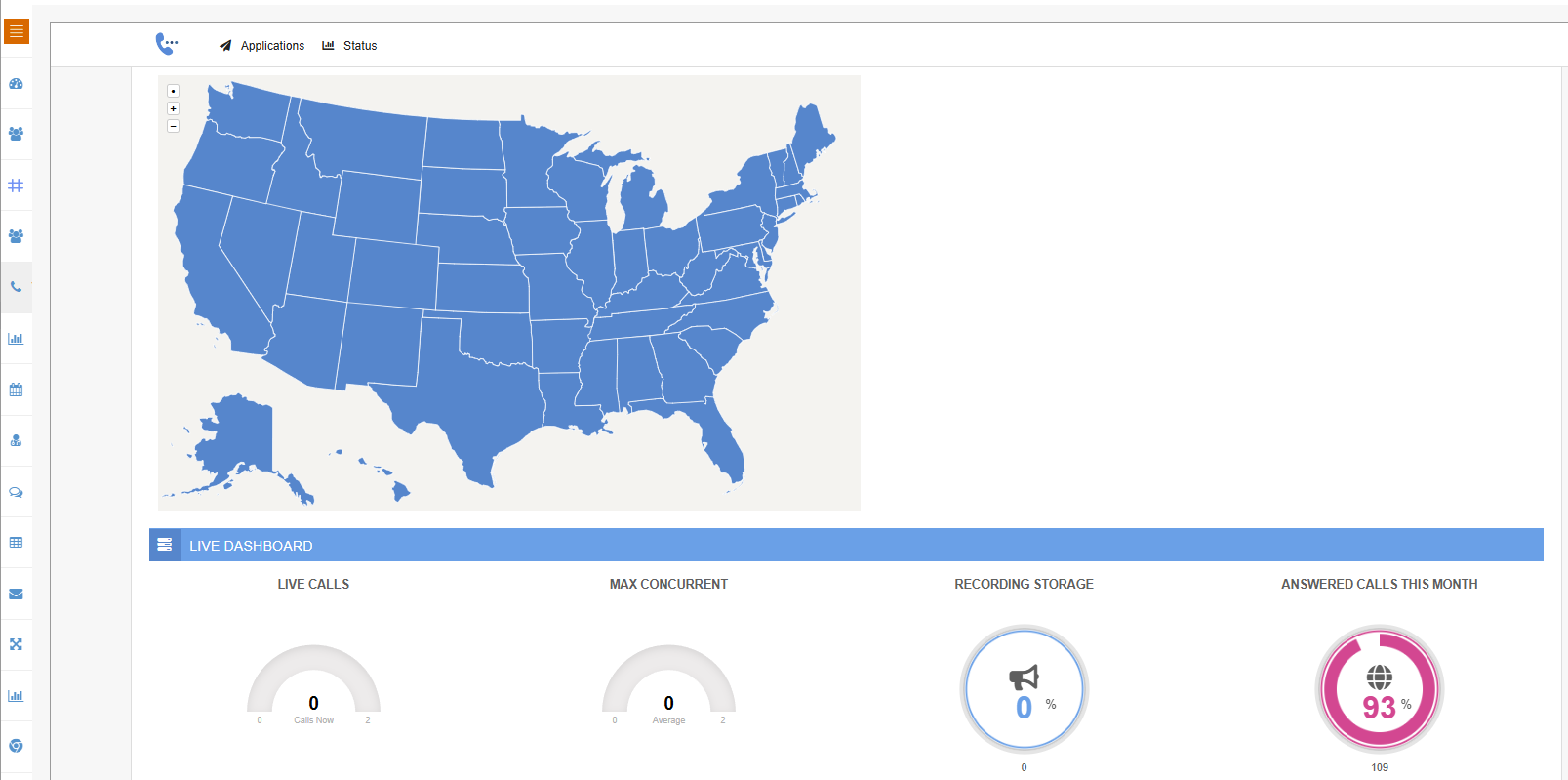
Cloud call management dashboard showing live calls, concurrent calls, recording storage and answered calls
Call management

See live call activity, concurrent calls, recording storage and answered calls in one dashboard. Use the phone system tools to manage your team’s call handling.

Full size

Windows, browser & desk phones

A business line wherever you work.

Use the Mango9 Windows app to call, message and handle social or website conversations. Connect browser calling and supported IP desk phones to the way your team works.

  • Calls, team chat, SMS, social messages and live chat in the Windows app
  • Chrome click-to-call and reusable voicemail drop recordings
  • Custom greetings, voicemail to email and hold music
  • Conference bridges and three-way calls for shared conversations
Get the Mango9 apps
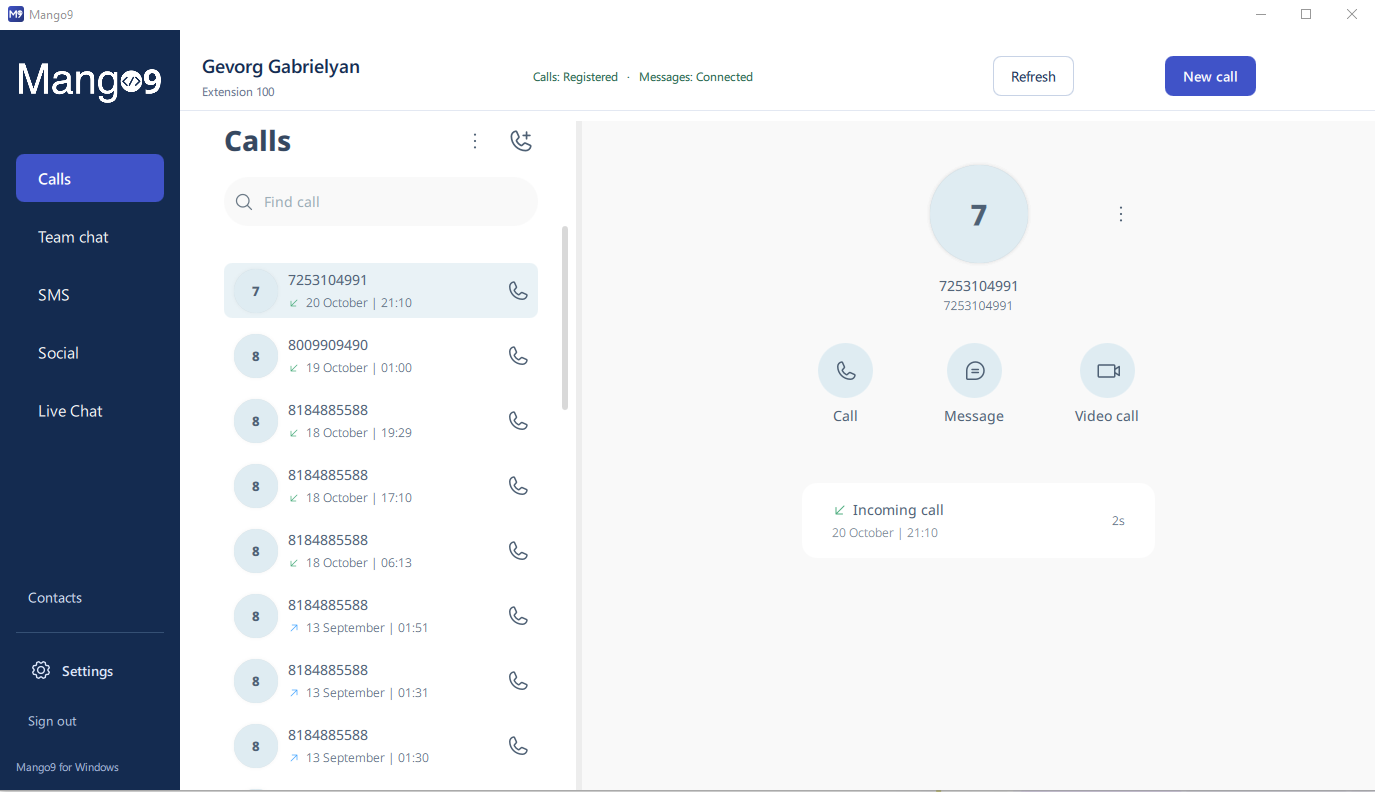
Current Mango9 for Windows app with call history, extension status and call and message actions
Windows calls

Search your call history, review incoming and outgoing activity, and start the next call or message from the Mango9 Windows app.

Full size

AI call intelligence

Turn conversations into better follow-up.

Review what was said, how the interaction went and what to do next. Give supervisors and assistants a clearer starting point for quality review and coaching.

  • Searchable transcripts with speaker labels and timestamps
  • Sentiment, call quality scores and review checklists
  • Summaries, key information and suggested action items
  • Coaching suggestions for the next conversation
Explore call intelligence
AI call summary with customer sentiment, agent quality scores and a review checklist
Sentiment & scores

Review customer mood and scores for empathy, professionalism and clarity. Use the checklist and recording to guide a human quality review.

Full size

Keep the next step connected

From outreach to paid work.

Campaigns, customer paperwork, agent assistance and lead delivery are part of the same Marketing OS workspace.

Email Campaigns

Turn your contact lists into repeatable email campaigns, with reusable content and reporting in the same workspace.

  • Import subscribers and organize campaign audiences
  • Create and reuse HTML email templates
  • Review campaign analytics and manage bounced subscribers
Ask about email campaigns

Quotes & Invoices

Keep the commercial side of a customer relationship alongside its calls, messages and follow-up.

  • Prepare quotes using item catalogs and templates
  • Export quote PDFs and create customer invoices
  • Record payments and track paid, partial and outstanding balances
Ask about quotes and invoices

AI Command Center

Talk or chat with your AI Supervisor to work through supported CRM tasks and configuration.

  • Ask for help with CRM tasks, setup and workflows
  • Review proposed changes and approve supported actions
  • Follow agent activity and inspect reported results
Explore AI agents

Lead & Appointment Selling

Run a lead or appointment business with AI agents, virtual call center assistants and a connected CRM.

  • Set buyer assignments, pricing tiers and distribution campaigns
  • Control delivery with buyer caps and campaign rules
  • Review delivery logs, call distribution and buyer reports
Learn to build your lead business

Marketing OS · Mobile

Your CRM.
Wherever you go.

Follow up with a lead, reply to a customer and keep your team connected. Bring your customer workspace along for the day.

  • Your leads and client records, close at hand
  • SMS, social messages and live chat in one place
  • Team conversations that keep work moving
  • Calendar, appointments and everyday tasks
Get the Mango9 app

Part of your Marketing OS workspace.

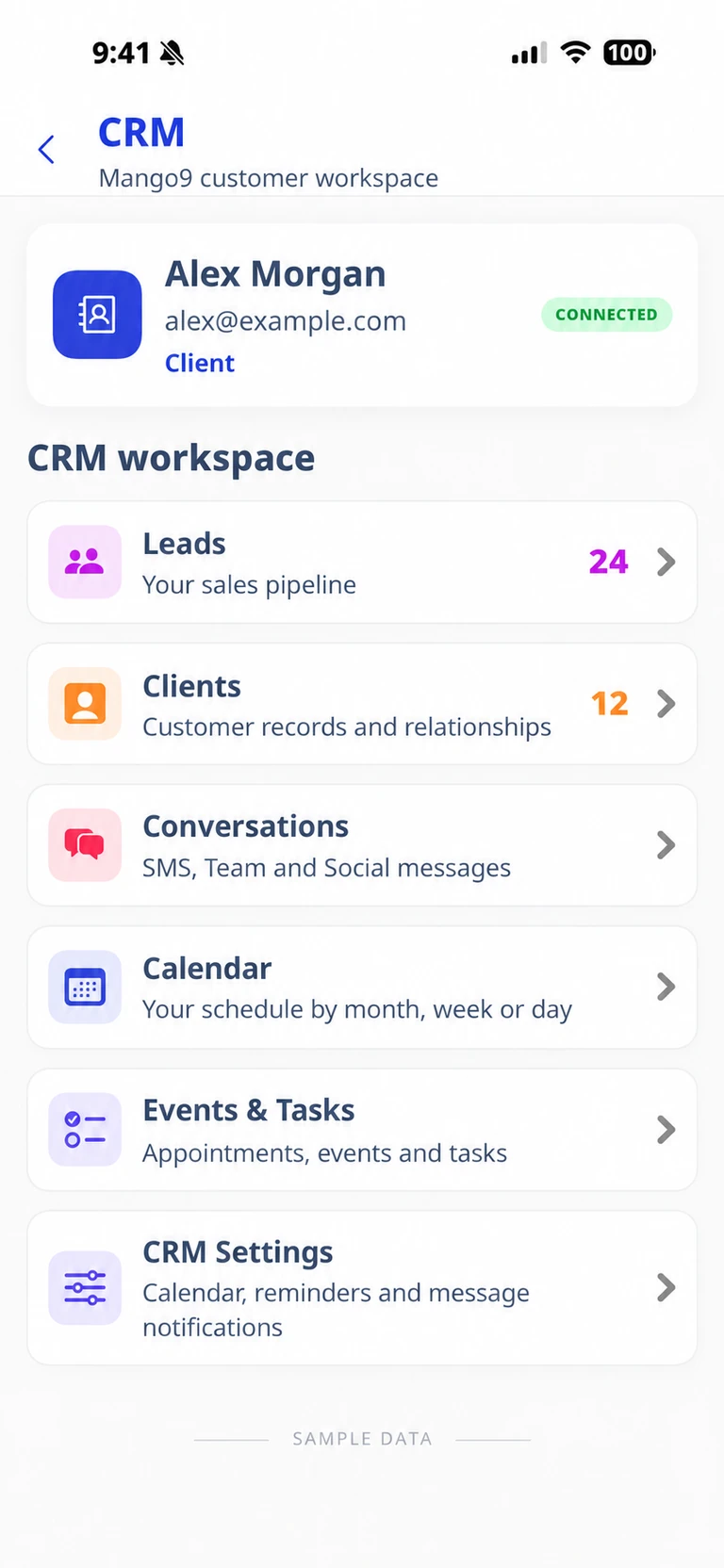
Sample Mango9 mobile CRM workspace with leads, clients, conversations, calendar and tasks
CRM workspaceOpen leads, clients, conversations, calendars and tasks from your mobile CRM workspace.
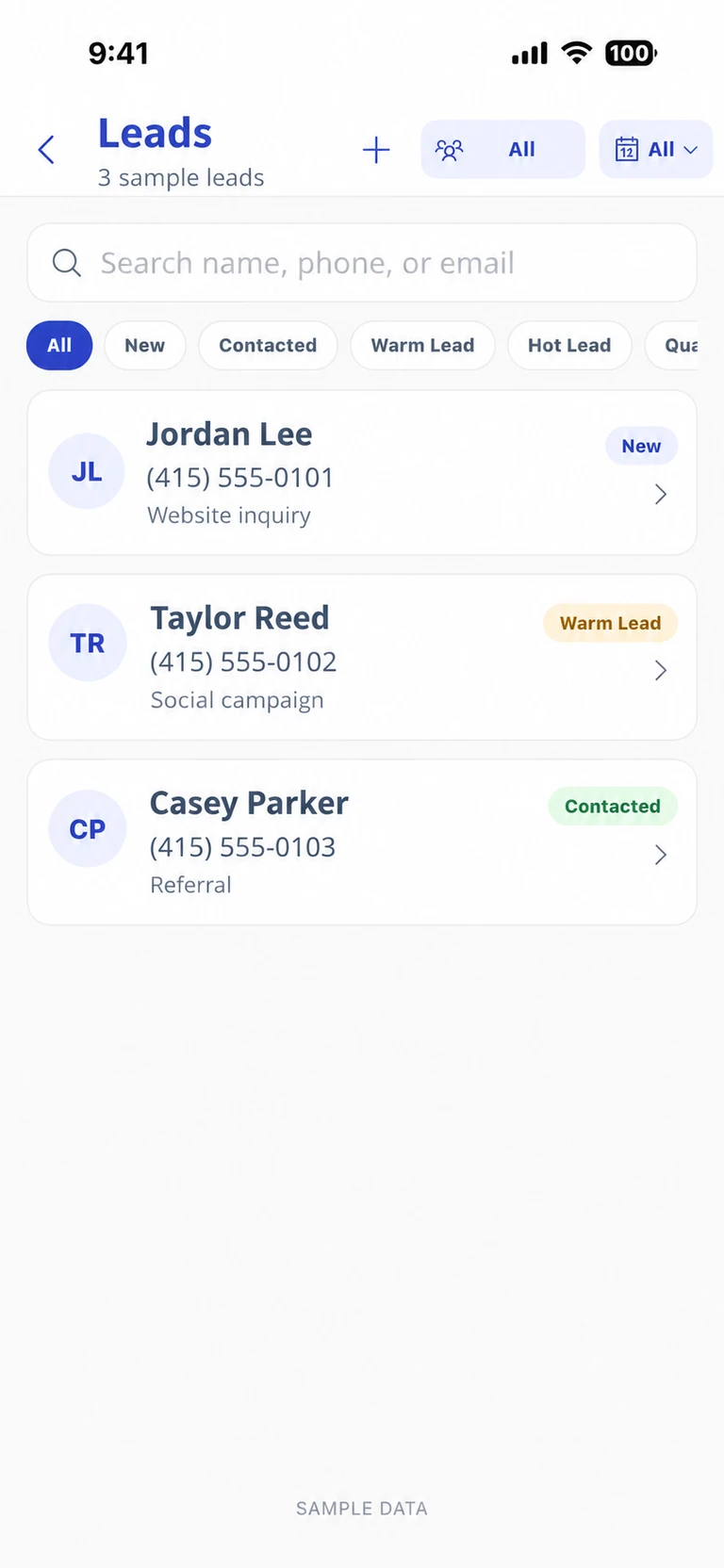
Sample mobile lead list with fictional contacts and lead statuses
LeadsSearch contacts and filter by lead status so you can pick up the right follow-up.
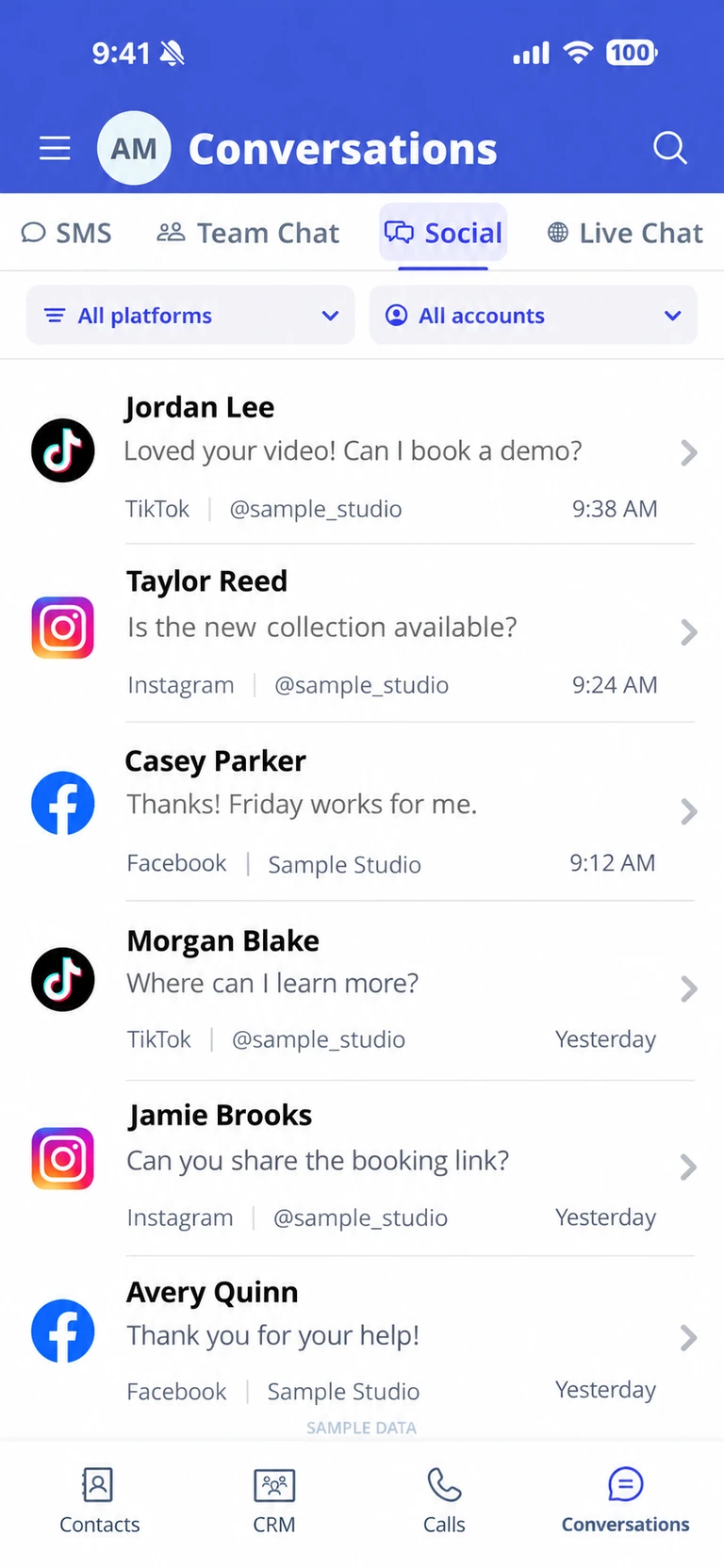
Sample social inbox with fictional TikTok, Instagram and Facebook conversations
Social inboxRead supported Instagram, Facebook and TikTok conversations from your connected accounts in one place.

Illustrative screens · Sample data

CRM workspace, screenshot 1 of 9. Illustrative sample data.

Your next step

Bring your business together.

Choose your plan, connect your accounts and give your team one place to work.