Mango9 Builder Studio
Billing, credits, and plans
Understand the three billing concepts you will see most often without needing to learn the internal ledger.
Mango9 separates three concepts: your subscription plan, wallet credits used for AI work and other metered products, and production infrastructure usage.
These charges answer different questions. The plan describes what the account includes. The wallet records metered builder work and eligible purchases. Production usage records the live infrastructure serving customers. Seeing them together in Billing does not mean they are the same product.
Always use the live Plans and Billing screens for the current amount. Documentation explains how the categories work, while the product provides the active price, included credits, transaction status, and permissions for your account.
Example: A monthly plan may add wallet credits, a build may deduct from that wallet, and a dynamic published app may separately accumulate hosting usage while its server is awake.
When your role allows it, Billing brings together the account balance, transactions, plan information, and per-project production usage.
Your Billing page
Billing is the account ledger you can read without learning internal accounting terminology. The balance at the top is your current wallet. Transactions explain how it changed. Plan and payment controls show how the account is funded. Production line items identify live-app usage when applicable.
If you are a team member, the page follows your role. You may be allowed to view a balance but not change the plan or card. Ask an owner to adjust the role instead of sharing a payment login.
Example: A Builder can see that the wallet is low and notify the owner, while only the Billing role adds credits or updates the card.
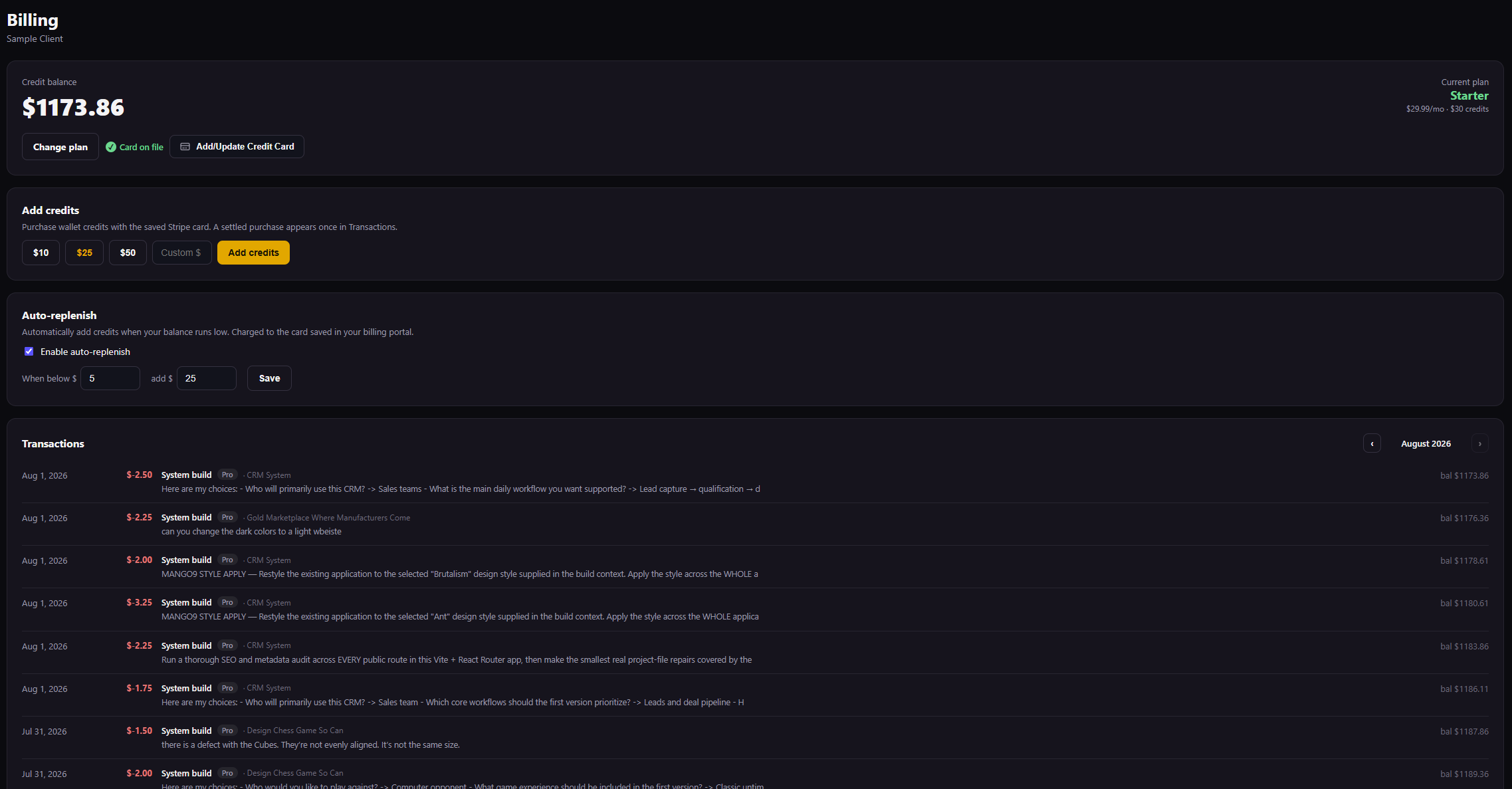
Billing puts the current balance, plan, payment controls, auto-replenish, and transaction history in one place.
Compare the currently available personal or team plans for this account. Review the live price, included credits, development resources, publishing features, and support before confirming a change. Open the secure payment flow managed for the account. Mango9 should receive the resulting payment status, not the full card details you enter in the protected billing screen. Choose a preset or permitted custom amount and purchase wallet credits with the saved payment method. The wallet should increase only after the payment succeeds and the transaction settles. Set the wallet balance that triggers a refill and the amount purchased when it does. Choose values that match normal account usage and that the billing owner is comfortable charging automatically. Review every visible debit or credit with its description, timestamp, project context, and balance afterward. Use this list when reconciling a build, refill, plan grant, or other wallet event.
1. Plan
Your plan controls account entitlements such as publishing and the capabilities shown in Plans. A plan may include a monthly wallet-credit grant. The current Plans page is the authority for available features and price.
Plan fees are billed through Mango9's billing system. Use the billing portal for payment methods and invoices when those controls are available to your role.
Choose a plan based on the account's real working pattern: individual or team use, development-server needs, publishing, workload, and support. The most expensive plan is not automatically the right starting point. You can compare the current plan with available upgrades directly on the page.
Included monthly credits are funding added according to the plan terms. They are not a promise that every build costs the same amount or that production infrastructure is free. Review the plan card and confirmation before changing tiers.
Example: A solo founder building one app may begin with a personal plan. An agency sharing projects and permissions across several people should compare the team plans.
Personal plans
Personal plans are intended for one account owner building and operating their own projects. Compare included credits, development resources, publishing features, and support. If you later need shared access with separate roles, move to the appropriate Team family rather than sharing the personal login.
Example: One consultant building a booking site can use a Personal plan and invite no teammates.
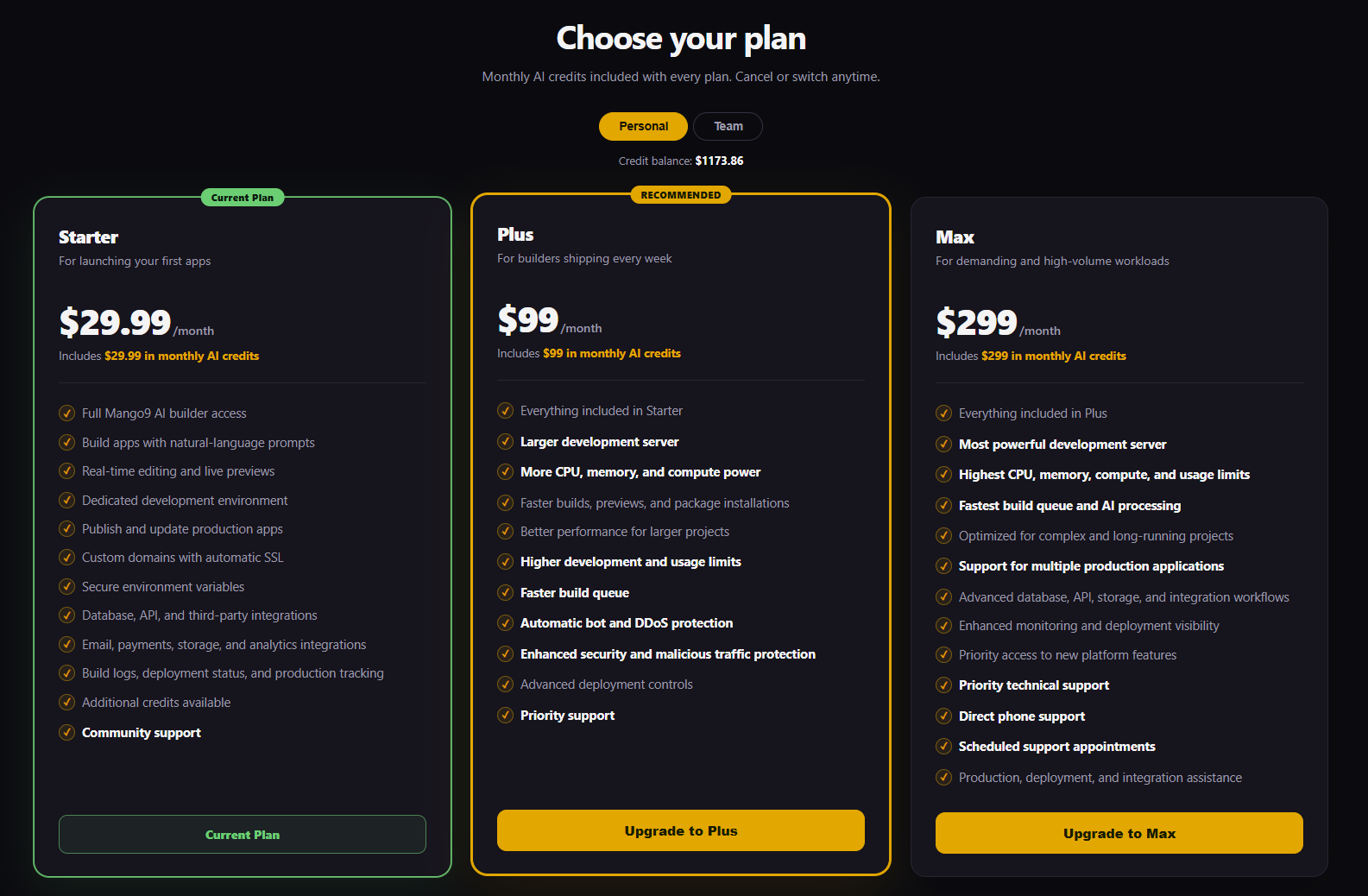
Switch to Personal to compare individual plans. The current plan, included monthly credits, server level, support, and other features are shown on each card.
Team plans
Team plans add collaboration around one account: a shared credit balance, member access, project assignment, and granular permissions. The plan is shared, while each teammate keeps their own login and role. Review both the monthly amount and the operational controls your team needs.
Example: A three-person agency can let designers build, finance review invoices, and the owner publish without giving every person the same authority.
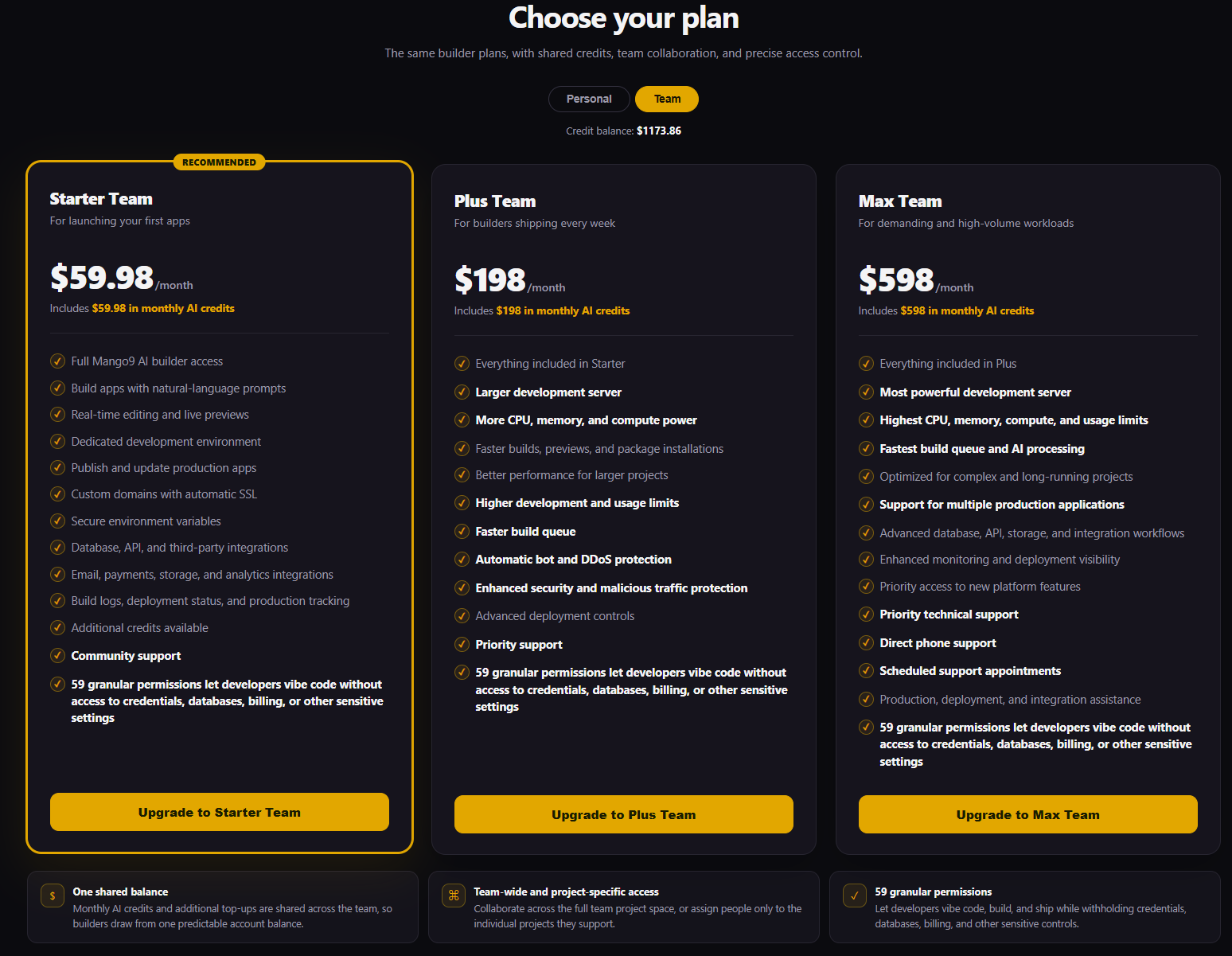
Team plans add a shared balance, collaboration, and permission controls. Use the Personal and Team switch at the top to compare the correct plan family.
Always use the live Plans page for current prices, included credits, limits, and features. Documentation examples can become older than the product.
2. Wallet credits
Wallet credits are a dollar-denominated balance used for metered work such as AI builds and eligible products. The account header and Billing page show the current balance.
Build usage depends on the work performed and model tier. Large projects and broad prompts often require more project context and work than a focused change.
You can add credits with the saved payment card. Auto-replenish can add credits when the balance falls below the configured threshold.
Each completed transaction shows the description, amount, and resulting balance. Builder charges are based on the work and selected model pricing active for the account, not on the number of visible sentences in the final answer. A focused request is easier to review and often uses less project context than a broad “fix everything” prompt.
Auto-replenish is optional. Set a threshold that leaves enough room for normal work and a refill amount you are comfortable purchasing automatically. A failed card charge should not create wallet value; resolve the payment before expecting the balance to increase.
Example: If the wallet falls below $10, an owner might configure a $25 refill so an active build is less likely to be interrupted by a low balance.
3. Production usage
Dynamic production apps use compute while their application server is awake. Billing can show per-project line items such as:
- awake compute usage;
- production service/flat charges;
- network egress;
- other production products shown by the current plan.
Static edge-hosted projects and dynamic server projects do not have identical infrastructure cost profiles. Review the classification and plan before publishing.
Static releases primarily serve prepared pages and assets. Dynamic releases run application logic and often connect to a database, so their production plan can include server time, service charges, storage, or network usage. Production Cloud identifies the selected project and hosting kind.
Do not estimate a dynamic app's needs from its page count alone. A small private portal with active server work can use more compute than a large static marketing site. Start with an appropriate plan and review measured usage before resizing.
Example: A five-page brochure site can be static, while a one-page live order dashboard with logins and saved data is dynamic.
Domains
Domain registration and renewal are separate products with registrar prices. A parked domain can continue to renew even when assigned to no project. Deleting or decommissioning a project does not cancel the domain.
Review the registration price, renewal information, and assignment independently from hosting. Parking keeps the name in the account without connecting it to an app. When you no longer need a domain, use the domain controls rather than assuming project deletion ends the registration.
Example: Deleting an old campaign project can leave
springoffer.comparked and renewing until an owner reassigns or cancels the domain.
How to use credits efficiently
- Use Ask when you only want discussion.
- Use built-in Publish, Versions, Domains, Billing, and Team controls for those operations.
- Keep build prompts focused on one coherent outcome.
- Attach only relevant context.
- Review the current result before requesting the next change.
- Restore a known version instead of asking the model to recreate it.
- Do not repeatedly submit a prompt while one build is active.
Efficiency comes from clear decisions and deliberate product controls, not from avoiding necessary verification. Discuss uncertain ideas in Ask, then send one coherent Build request. Use the completion card and Preview before deciding what work is truly next.
Example: Ask which import fields the CRM needs, then build the agreed import once. Do not send three overlapping builds while the first import is still running.
Transactions and permissions
The Billing page shows the authoritative transaction history available to your role. Team roles may separately control viewing costs, token-level detail, invoices, purchasing credits, changing plans, and updating payment methods.
Use the transaction description, timestamp, project, mode, and resulting balance to identify a charge. If something appears wrong, capture those non-secret details for support. Do not post card numbers, invoice links containing one-time tokens, or private payment-session information.
Example: Report “Project 354, Pro build, Aug 5 at 1:14 AM, $3.25 charge” rather than sending a screenshot that exposes payment details.
If the balance is low
Add credits or review auto-replenish. If a card is required or declined, no wallet credit should be granted until payment succeeds. Contact the account owner when your role cannot change billing.
Do not repeatedly resubmit a build as a way to test whether funds returned; duplicates can create new work after the balance is restored. Resolve the wallet or payment state first, then continue from the existing project and conversation.
Example: A teammate sees a low-balance message, asks the owner to refill, refreshes Billing after payment settles, and sends the original prompt once.
Plans, compute rates, included credits, and domain prices can change. Use the current Mango9 Plans, Billing, and purchase confirmation screens as the authoritative quote.