Mango9 Builder Studio
Databases
Understand when Mango9 requires Postgres and why persistent apps need it in production.
A database stores information that must survive page reloads, server restarts, deployments, and multiple users. Mango9 uses Postgres connections for production apps that persist data.
Think of the interface as the desk where people work and the database as the filing system behind it. A form can look complete in Preview, but the business value comes from saving its result where the right users can find it later. That durable behavior becomes essential once real customers or staff depend on the app.
Mango9 separates the development database used while building from the production database used by the live release. This protects real customer records from sample work and gives the production owner clear responsibility for backups, access, and recovery.
Example: A lead entered in a CRM today should still exist after the user signs out, the server restarts, and a new app version is published next week. That requires a production database.
Does every project need a database?
No.
A purely static site can publish without one. Examples include a brochure site, portfolio, documentation site, or landing page whose content is built into the release.
An app usually needs a database when it includes:
- user accounts or roles;
- records created or edited by users;
- bookings, orders, leads, tasks, inventory, or messages;
- saved settings or preferences;
- server-side audit history;
- application data shared across users or devices.
Ask what should happen after the browser closes. If the correct answer is “the information must still be there for this user or another user,” the project probably needs durable storage. If every visitor only reads the same prepared content and never saves activity, a database may add unnecessary setup.
Some sites have both kinds of behavior. Public marketing pages can be static while a private customer portal is dynamic and database-backed. Mango9 evaluates the actual project behavior rather than deciding from the number of pages.
Example: A photographer portfolio with fixed galleries can be static. The same site needs a database after customers can create accounts, select favorites, and leave approval notes.
Example: A calculator that produces a result and forgets it after closing may not need a database. Saving past calculations for a team does.
Why Mango9 checks before publishing
The development preview can prove the interface and workflow, but a production app needs a durable place for real customer data. Without a reachable production database, a data-driven app could appear live while losing records or failing when it restarts.
Mango9 classifies the project before publishing. If the app stores data and no production database is connected, Publish pauses with a Connect database step instead of releasing a broken app.
This is a readiness check, not an attempt to sell every project a database. It prevents a common failure where a development interface appears convincing but production has nowhere durable to store accounts or records. Static apps continue through the route that fits their actual needs.
The check also helps connect the right environment. A development connection, a sample local database, or a credential saved for a different project should not silently become the live customer database.
Example: A booking app can demonstrate appointment screens in Preview. Publish pauses until the live app has a production Postgres connection that can safely keep real bookings.
A dynamic project can preview while it is being built, but production needs a durable database before customer records, logins, or other saved data can be trusted across restarts and releases.
Connect Postgres
Create the database in an account your organization controls, then save the connection through Mango9's protected Integration or Environment Variable controls. Do not paste the URI into Chat or a project document. The connection string normally contains a database username, hostname, and password.
Link the saved credential only to the intended project and use Test before publishing. A saved green credential and a project link are separate facts: the account may possess a database connection without giving every app permission to use it.
Example: Save “Northstar production Postgres” in the account vault, connect it only to the Northstar CRM project, test it, and then return to Publish.
Use an available managed Postgres provider such as Neon or Supabase, or another compatible provider approved for your project.
Use the provider's URI/connection-string format. Treat it as a secret.
Choose the current project and save the connection under the database integration or DATABASE_URL entry shown by Mango9.
Mango9 checks the connection again and applies it to the production release.
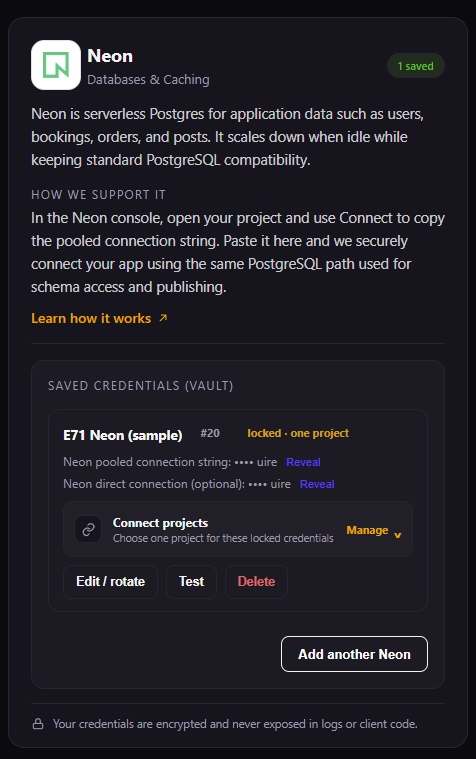
A saved database credential is not automatically available to every app. Use Connect projects to link it to the intended project, then Test the connection.
Use the connection type Mango9 requests. A pooled connection is often best for normal app traffic; some schema or migration operations may also require the provider's direct connection. Keep both private.
Development and production data
Development and production are separate operating contexts. Do not assume sample data in Preview should become customer data. When production uses your external Postgres provider, that provider remains the authority for backups, retention, access controls, and point-in-time recovery.
Use fictional or clearly marked sample records during development. Production begins with the records intentionally created or imported into the live database. If the launch requires existing business information, plan a reviewed import instead of assuming Preview samples will be copied.
Example: “Jane Test” and sample appointments used during a build stay in development. Import the approved customer list into production through a dedicated, tested workflow.
Schema changes
A build can change the app's expected data model. Review data-sensitive updates carefully, especially when a production database already contains real records. Keep provider backups enabled and publish focused changes.
A schema change means the shape of stored information changes: a field is added, a relationship changes, or a record type is introduced. Adding an optional note is usually less risky than renaming or removing a field used by existing production records. Describe preservation requirements in the Build prompt.
Example: “Add an optional delivery instruction to orders. Keep all existing orders valid and do not rename or remove current fields.”
Common questions
Can I use local storage instead?
Local browser storage is suitable only for data that belongs to one browser and can be lost. It is not a substitute for shared accounts, business records, bookings, orders, or server-side access control.
Local storage can be reasonable for temporary display preferences, such as whether one browser prefers a compact list. It cannot securely enforce roles or make one user's updates available to the team.
Example: Remembering a dark-theme preference locally is fine. Storing the company's customer database only in one manager's browser is not.
Can I connect later?
Yes. Build and review the project first. Mango9 asks for the production connection when the release actually needs one.
Connecting later is often a sensible workflow because it lets you prove screens and user paths before real data exists. Do not wait until after launch, however, when the project is already known to require persistent customer records.
Example: Finish and test the booking workflow with sample development data, then connect production Postgres during the publish setup.
Why does Publish say the database is connected but unused?
The project may no longer require it or may not read the expected variable. Review the app and integration before publishing; unused credentials should not be kept without purpose.
Confirm that the app actually uses the variable name shown by the integration and that you selected the intended project. If the app became static after a redesign, disconnecting an unnecessary credential reduces confusion and exposure.
Example:
DATABASE_URLis saved for Project A, but you are publishing Project B. Link the correct project rather than copying the secret into Chat.
Save it in Integrations or Environment Variables. Refer to the variable name in your prompt, not the secret value.