Mango9 Builder Studio
Recommended additions
Choose useful next features and send them as focused follow-up builds.
After a successful build, Mango9 may suggest a few additions that fit what you just created. Nothing starts automatically—you choose what is worth building next.
Recommendations are optional product ideas, not warnings and not a checklist you must finish. They are most useful when the current result works and you want a sensible next step without writing a prompt from scratch. The card opens collapsed so it does not interrupt your review; reveal it when you are ready for ideas.
Read each suggestion against your real first-release goal. A good idea can still be unnecessary today, and skipping it does not make the existing build incomplete. You can also type a more important follow-up directly in the composer.
Example: A new CRM may suggest automated lead routing. If the first team has only two salespeople, you can leave that for later and build the customer import they need now.
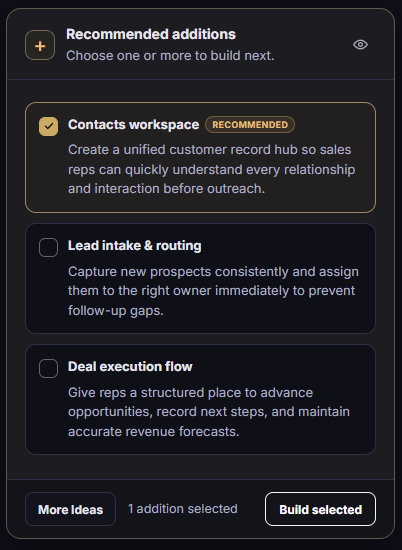
Select one or more ideas, ask for different ideas, or collapse the card with the eye button.
What each control does
The card is designed to help you decide before any work starts. Selecting an idea only marks it; Build selected is the action that turns the choice into a normal build request. You can open, review, and close recommendations without changing the project or spending build credits.
When several ideas appear, compare the user benefit and the amount of new workflow they introduce. The recommended marker identifies the strongest fit based on the project context, but it does not override your business priority.
Example: Select “Contacts workspace” when the sales team needs one customer record now. Leave “Deal execution flow” unselected if deal stages have not been agreed yet.
Select or clear one proposed addition after reading its user outcome. Highlighting marks the idea for the next request but does not start work by itself. Marks the idea Mango9 believes best fits the current project and recent result. Treat it as guidance, then compare it with the release your users actually need. Replace the current list when none of the suggestions fits your priority. The new ideas remain optional and still require selection before anything can be built. Send the chosen additions through the normal Build process. Select a small related group so the result has one clear purpose and acceptance check. Collapse the full card into a thin reminder so it does not interrupt the conversation. Mango9 remembers the visibility preference, and you can open the card again whenever you want ideas. Confirm how many additions will be included in the request. Recheck this number before building so an old selection is not included accidentally.
Build a recommendation
One recommendation usually makes the cleanest follow-up. Choose several only when they form one natural workflow and can be tested together. Combining unrelated additions can increase build time, make visual review harder, and leave you unsure which part caused a problem.
Before pressing Build selected, read the selected count and the idea descriptions one more time. The resulting request follows the same Build process as anything you type, including normal progress, verification, saved changes, and a completion card.
Example: “Lead intake” and “lead routing” may belong together. “Lead routing,” “dark-mode redesign,” and “invoice export” are three separate outcomes and should be built separately.
Make sure the feature solves something a user needs now. Choose one idea, or a small group that belongs in the same update. The selected text becomes the next focused project prompt. Try the new feature in Preview before publishing it.
A recommendation continues the existing project. It does not replace the Brief or repeat the first-project questions.
When to skip an idea
Skip or collapse recommendations when the current release is already complete, the idea adds data or permissions you do not need, or the last build still needs a focused correction.
Also skip an idea when it duplicates a feature already present. Recommendations use current project context, but you remain the best judge of the business workflow. If a similar feature exists, open it in Preview before deciding whether the suggestion adds anything new.
Example: If the project already has customer notes on the detail page, do not build a suggested “customer notes” feature again. Ask for a specific improvement to the existing notes only if one is needed.
You can always type your own next step
Instead of choosing a suggestion, write a normal Build request such as: “Add CSV export to the contacts list. Keep filters, sorting, and mobile layout unchanged.”
If the last build needs another pass
Use Retry same prompt when the request is still correct. If a stronger available model is offered, use Retry with… for a harder repair. The original request is preserved; you do not need to rewrite the whole Brief.
Do not use a recommendation to hide an unfinished result. Correct the named defect first, then consider expanding the product. A narrow repair prompt should identify what failed, where it appears, and which successful work must remain.
Example: “The new Contacts page works, but the mobile Add contact button covers the last row. Fix that overlap only and preserve the completed desktop page.”
They update development only. Publish separately when the new result is ready for customers.